Connecting Your Marketing Channels
Last updated: January 29, 2026
Marketing channel connections allow us to automatically import your advertising spend, performance data, and customer insights—giving you accurate profitability metrics without manual data entry. Connect the platforms you use to get a complete view of your marketing efficiency.
Supported Marketing Channels
We currently integrate with the following platforms:
Google Analytics 4 (GA4) - Website traffic and conversion data
Google Search Console - Organic search performance
Google Ads - Paid search advertising spend and performance
Meta Ads (Facebook & Instagram) - Social advertising spend and performance
TikTok Ads - TikTok advertising spend and performance
Klaviyo - Email and SMS marketing attribution
ReCharge - Subscription revenue and customer data
Connecting Your Marketing Channels
How to Access Marketing Connections
Navigate to Settings in the left-hand menu
Click Connections
You'll see all supported channels plus any currently connected channels
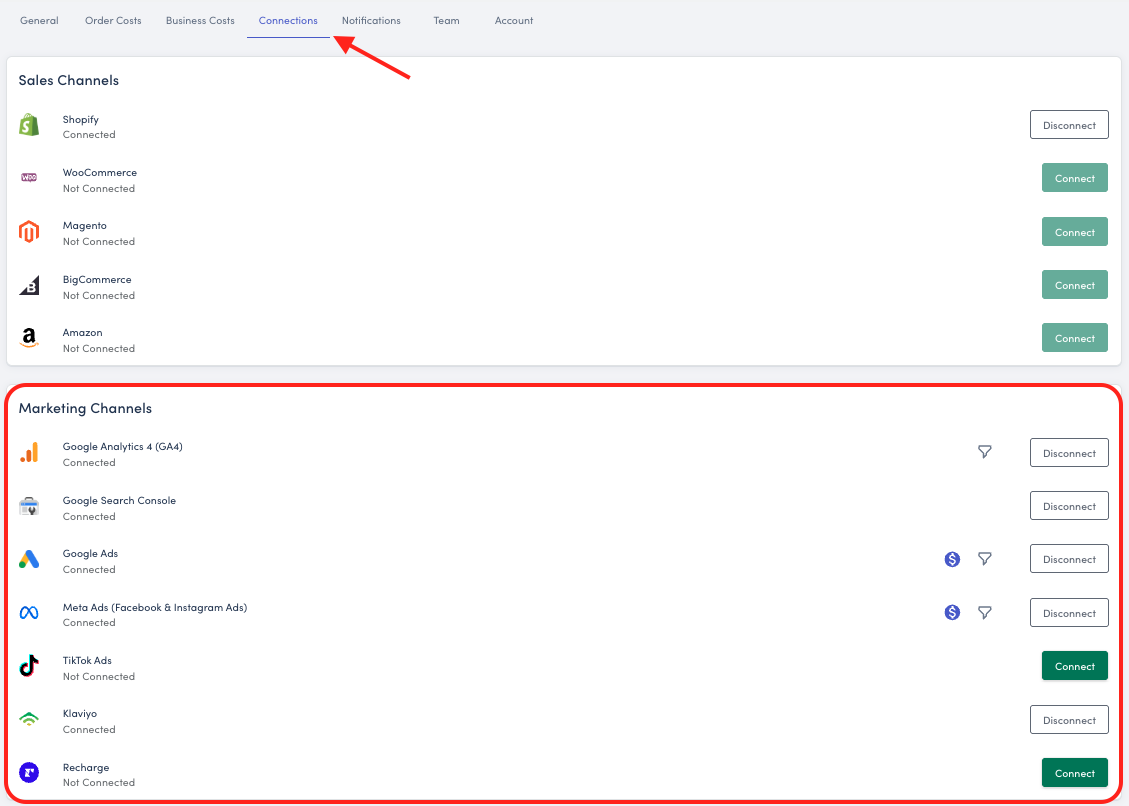
Google Marketing Channels
Important: Google Analytics 4, Google Ads, and Google Search Console must all be connected using the same Google account. All Google services require the same account for data consistency.
Google Analytics 4 (GA4)
GA4 provides essential website traffic, user behavior, and conversion data.
To Connect:
Click the Connect button next to Google Analytics 4
Sign in with your Google account
Select the GA4 property you want to connect
Grant the necessary permissions
Confirm the connection
Google Search Console
Track your organic search performance, keyword rankings, and site health.
Important: You must use the same Google account that you used to connect Google Analytics 4. All Google services (GA4, Search Console, and Google Ads) require the same account for data consistency.
To Connect:
Click the Connect button next to Google Search Console
Sign in with the same Google account used for GA4
Select your website property
Grant the necessary permissions
Confirm the connection
Google Ads
Import your paid search advertising spend, campaign performance, and conversion data.
To Connect:
Click the Connect button next to Google Ads
Sign in with the same Google account used for GA4 and Search Console
Select your Google Ads account
Grant the necessary permissions
Confirm the connection
Sync Details:
Ad spend automatically syncs hourly
Campaign performance data updates in real-time
Historical data imports within 30 minutes
Paid Ad Channels
Meta Ads (Facebook & Instagram)
Connect your Meta advertising account to track spend and performance across Facebook and Instagram campaigns.
To Connect:
Click the Connect button next to Meta Ads
Sign in to your Facebook Business account
Select your Ad Account
Grant the necessary permissions
Confirm the connection
What Gets Synced:
Hourly ad spend across all campaigns
Campaign-level performance metrics
Conversion tracking data
Additional Features: Once connected, you can set up filters to exclude specific campaigns or filter by campaign tags for more granular reporting.
TikTok Ads
Import your TikTok advertising spend and campaign performance data.
Important: This integration pulls in advertising spend and performance data only—similar to Meta Ads and Google Ads. This is not a TikTok Shop integration for order fulfillment or product syncing.
To Connect:
Click the Connect button next to TikTok Ads
Sign in to your TikTok Ads Manager account
Select your advertising account
Grant the necessary permissions
Confirm the connection
What Gets Synced:
Hourly ad spend across all campaigns
Campaign-level performance metrics
Conversion tracking data
Email & Subscription Marketing
Klaviyo
Connect Klaviyo to track email and SMS marketing attribution, helping you understand the revenue impact of your retention campaigns.
To Connect:
Click the Connect button next to Klaviyo
Sign in to your Klaviyo account
Grant the necessary API permissions
Confirm the connection
What Gets Synced:
Email campaign performance
SMS campaign metrics
Customer engagement data
Revenue attribution from email and SMS
Important Note on Klaviyo Costs: Klaviyo does not provide spend data through the integration. To track your Klaviyo subscription costs and include them in your profitability calculations, add them as a recurring expense under:
Settings > Order Costs > Additional Marketing Costs
This ensures your email and SMS marketing costs are factored into your overall MER and profitability metrics.
ReCharge
For subscription-based businesses, ReCharge integration provides detailed subscription revenue and customer lifetime value data.
To Connect:
Click the Connect button next to ReCharge
Sign in to your ReCharge account
Grant the necessary permissions
Confirm the connection
What Gets Synced:
Subscription revenue
Churn metrics
Recurring order data
Managing Your Connections
Viewing Connected Channels
Connected channels display a "Connected" status with additional options:
Filter icon - Set up data filters (available for select platforms)
Sync icon - View last sync time and manually trigger a sync
Disconnect button - Remove the connection
Disconnecting a Channel
Click the Disconnect button next to the active connection
Confirm you want to disconnect
Your historical data will not be preserved and new data will stop syncing
You can reconnect the same channel at any time.
Using Filters
Some marketing channels support filters to refine which data gets imported.
Common Use Cases:
Exclude test campaigns
Filter by campaign naming conventions
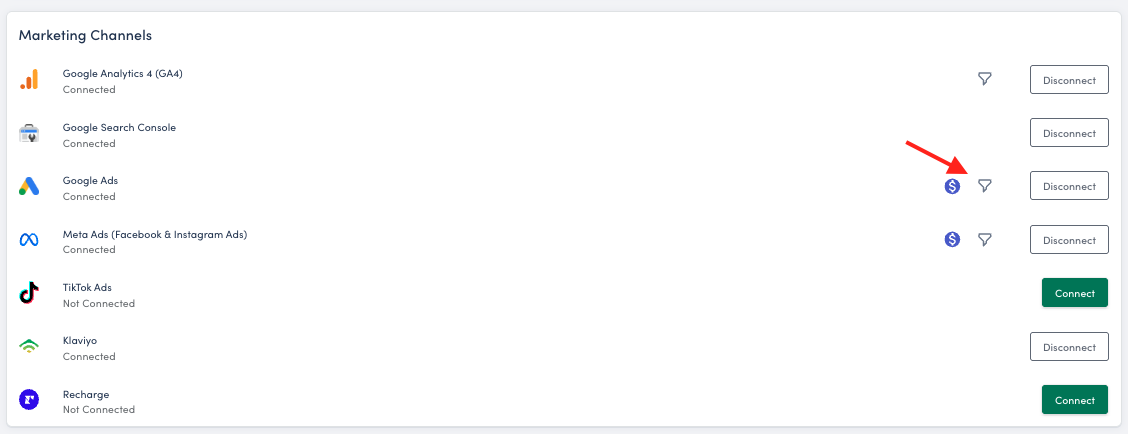
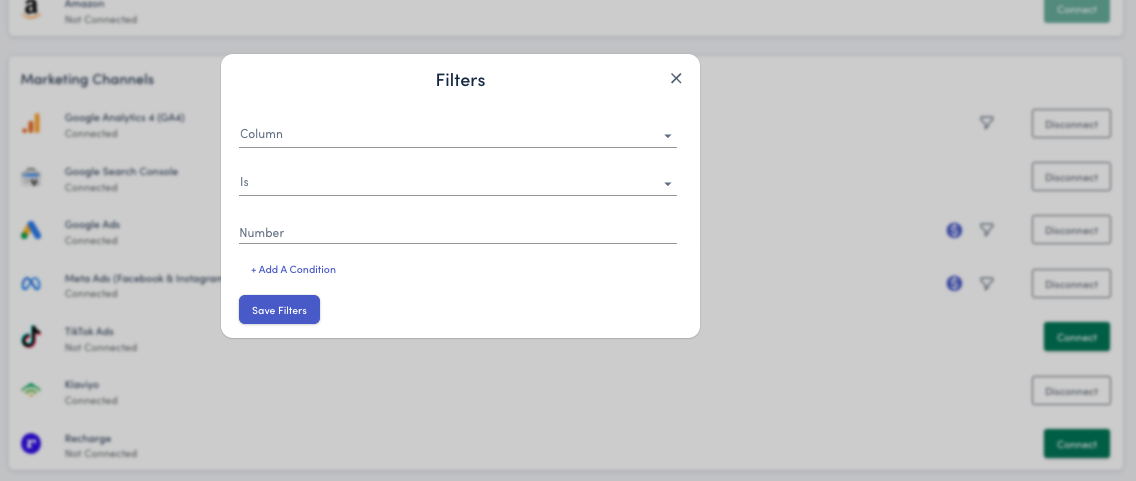
Best Practice: Use the "contains" filter option rather than "equals" to ensure reliable filtering regardless of capitalization or formatting variations.
Converting Currency
Marketing channels support currency conversion to ensure all your spend data is reported consistently in your store's currency.
To Change Currency:
Click the currency icon next to the connected channel
Select the currency you want to convert from (the currency your ad spend is billed in)
Your marketing spend will automatically convert to match your store's currency
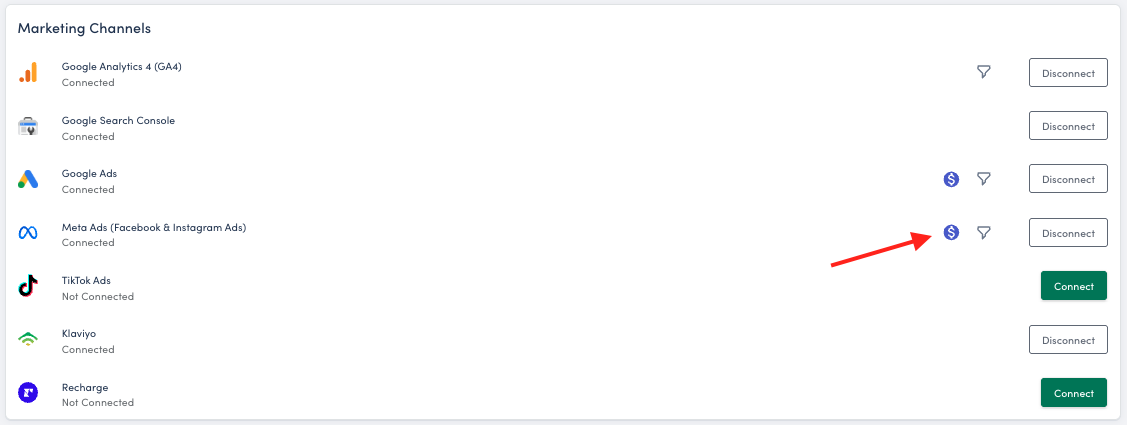
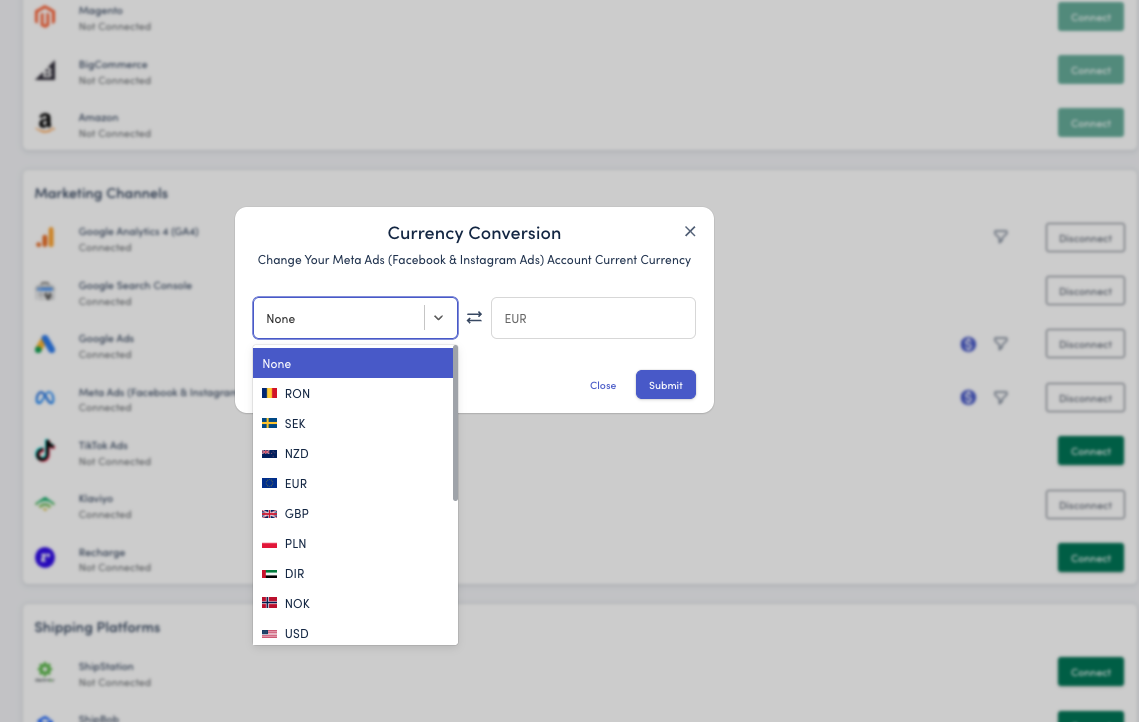
Example: If your store operates in EUR but your Google Ads account is billed in USD, you can convert USD spend to EUR for consistent reporting.
Data Sync Timing
After connecting a marketing channel:
Recent data appears within a few minutes
Full historical sync completes within an hour
Daily updates happen automatically throughout the day
Troubleshooting
Google Channels Are Showing Data
Problem: No data flow from GA4, Ads, or Search Console
Solution: Ensure you're using the same Google account for all three services. If you manage these platforms with different accounts, you'll need to grant access to a single account first.
Missing Historical Data
Problem: Only seeing recent data
Solution: Full historical syncs can take up to 6 hours. Ensure the connected account has historical spend. Check back later or contact support if data is still missing after 24 hours.
Next Steps
Once your marketing channels are connected:
Review your MER and aMER metrics to understand overall marketing efficiency
Set up filters to exclude non-revenue campaigns
Configure your cost allocations to ensure accurate profitability tracking
Explore your Store Overview dashboard to see unified performance across all channels
Learn more about MER vs ROAS →
Need Help?
If you encounter issues connecting your marketing channels or have questions about data syncing, our support team is ready to assist. Contact us at support@storehero.ai