Setting Up Fulfillment & Packaging Fees
Last updated: January 30, 2026
Fulfillment and packaging costs are critical for accurate profit calculations, especially if you work with a 3PL (third-party logistics) or fulfillment provider who processes orders on your behalf.
Navigate to Settings > Order Costs > Fulfillment to begin configuring your fees.
Available Methods
StoreHero offers two methods to track fulfillment and packaging costs:
Simple Method - For fixed costs that don't change with order volume
Variable Method - For tiered pricing based on number of items per order
Understanding the Cost Structure
Both methods allow you to set costs that apply per order and/or per item. This typically includes:
Fulfillment Costs:
Base cost per order (usually includes the first product)
Cost per additional product
Packaging Costs:
Base cost per order (usually includes the first product)
Cost per additional product
Important: All values should be entered excluding sales tax (e.g., VAT, GST).
Simple Method
Use the simple method when your fulfillment provider charges fixed rates regardless of order volume.
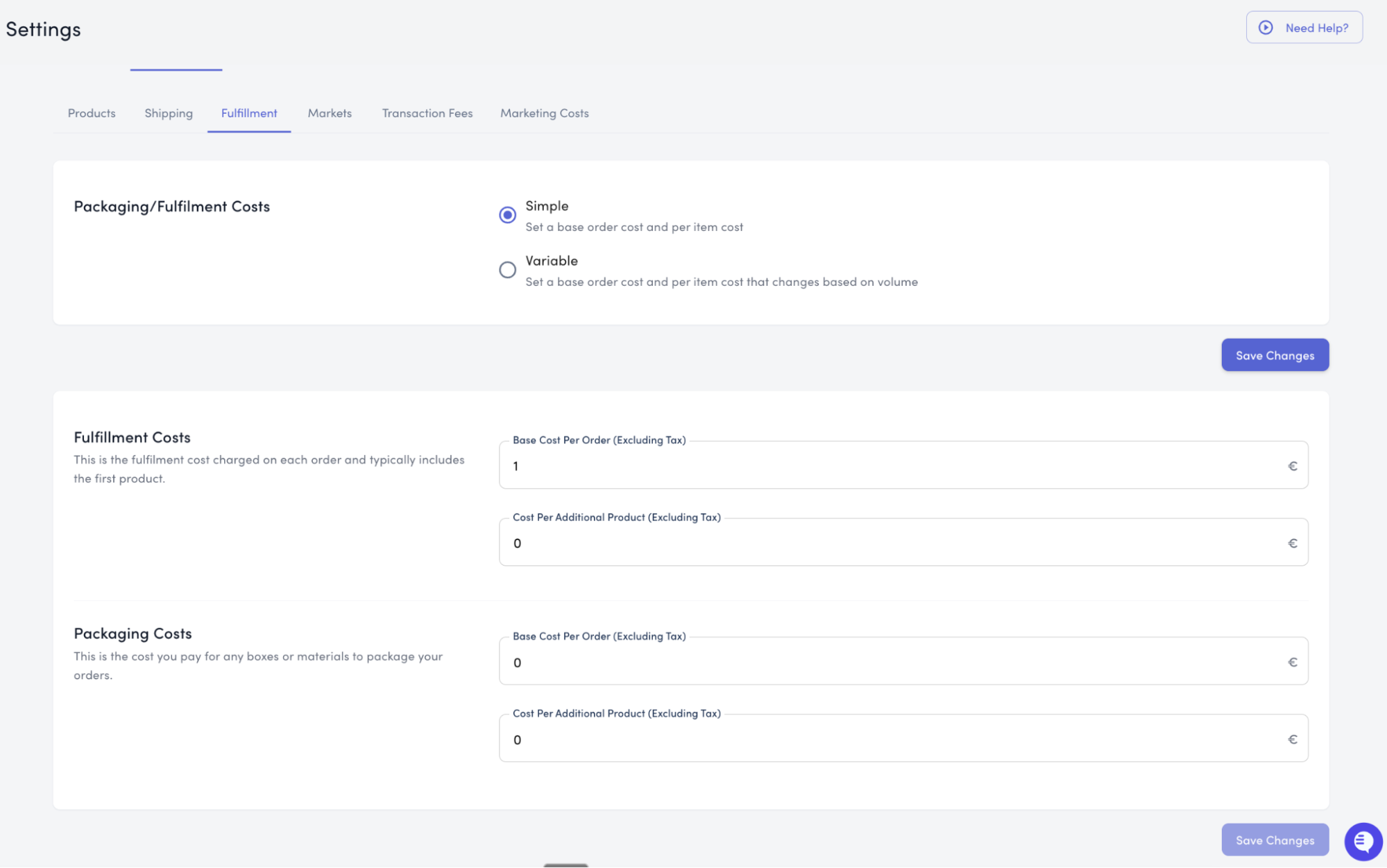
When to Use This
This method works well if:
Your costs remain consistent across all order sizes
You have straightforward per-order and per-item pricing
Your provider doesn't offer volume-based discounts
Setting Up Fulfillment Costs
Navigate to Settings > Order Costs > Fulfillment
Ensure Simple method is selected
Enter your fulfillment costs:
Base Cost Per Order - The fulfillment charge for each order
Cost Per Additional Product - The charge for each additional item in the order
Example: Your fulfillment provider charges €4 per order and €0.40 for each additional item.
Order with 1 item: €4.00 fulfillment cost
Order with 3 items: €4.80 fulfillment cost (€4 + €0.40 + €0.40)
Setting Up Packaging Costs
In the same section, enter your packaging costs:
Base Cost Per Order - The packaging charge for each order
Cost Per Additional Product - The charge for each additional item in the order
Example: Your packaging costs €1 per order and €0.10 for each additional item.
Order with 1 item: €1.00 packaging cost
Order with 2 items: €1.10 packaging cost (€1 + €0.10)
Finalizing Simple Method
Review your entered costs
Click Save Changes
Your fulfillment and packaging costs will now be automatically calculated for all orders based on the number of items.
Variable Method
Use the variable method when your fulfillment provider offers different pricing tiers based on order volume.
When to Use This
This method works well if:
Your provider offers volume-based discounts
Costs change based on number of items per order
You have different rates for small vs. large orders
Example Use Case: Your provider charges one rate for orders with 1-5 units, but offers discounted pricing for orders with 6-10 units.
How to Enable Variable Method
Navigate to Settings > Order Costs > Fulfillment
Click the Variable option
Click Save Changes to save this calculation method
Adding Cost Tiers
Once the variable method is enabled:
Click the Add Costs button
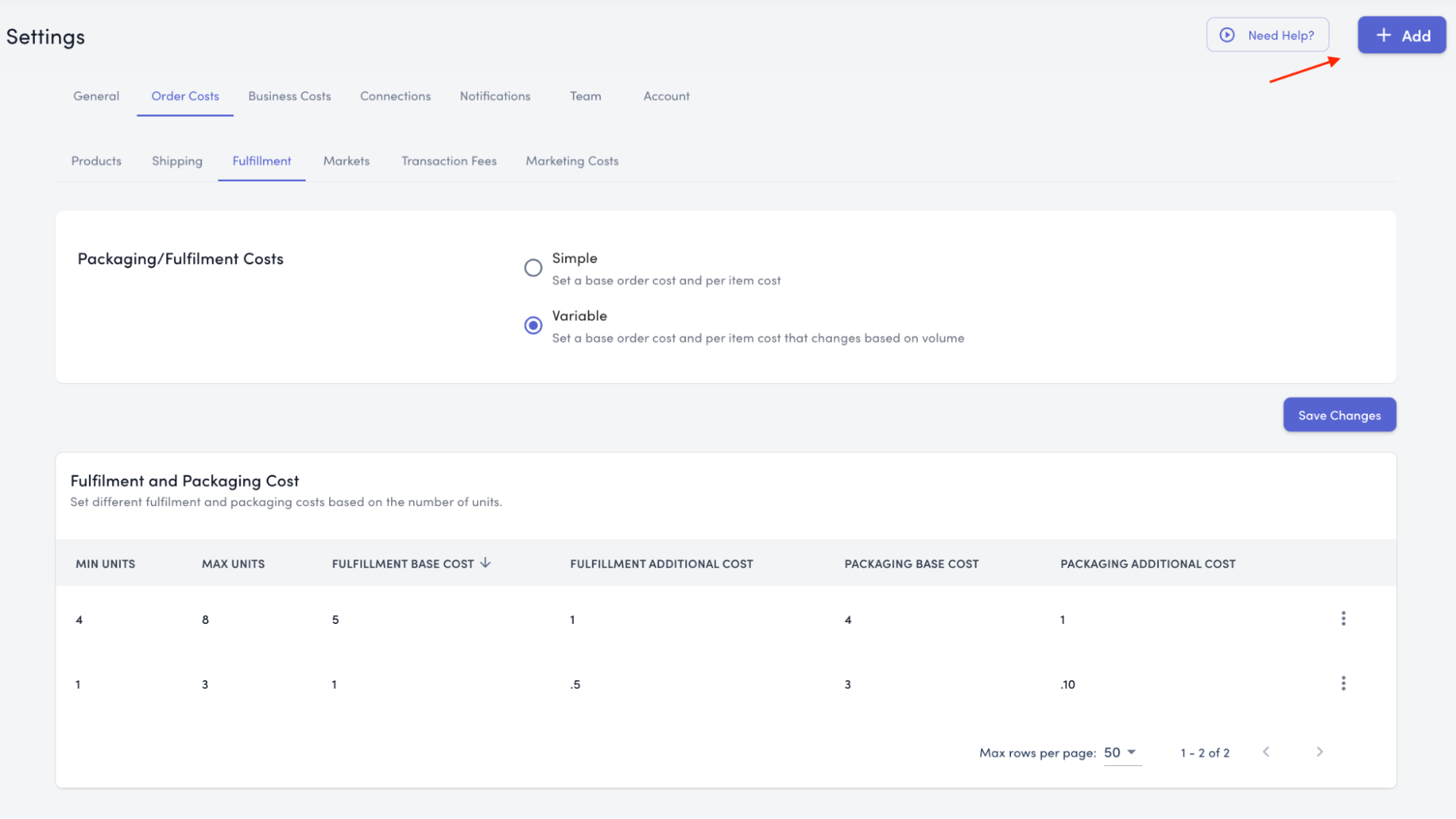
A popup will appear with the following fields:
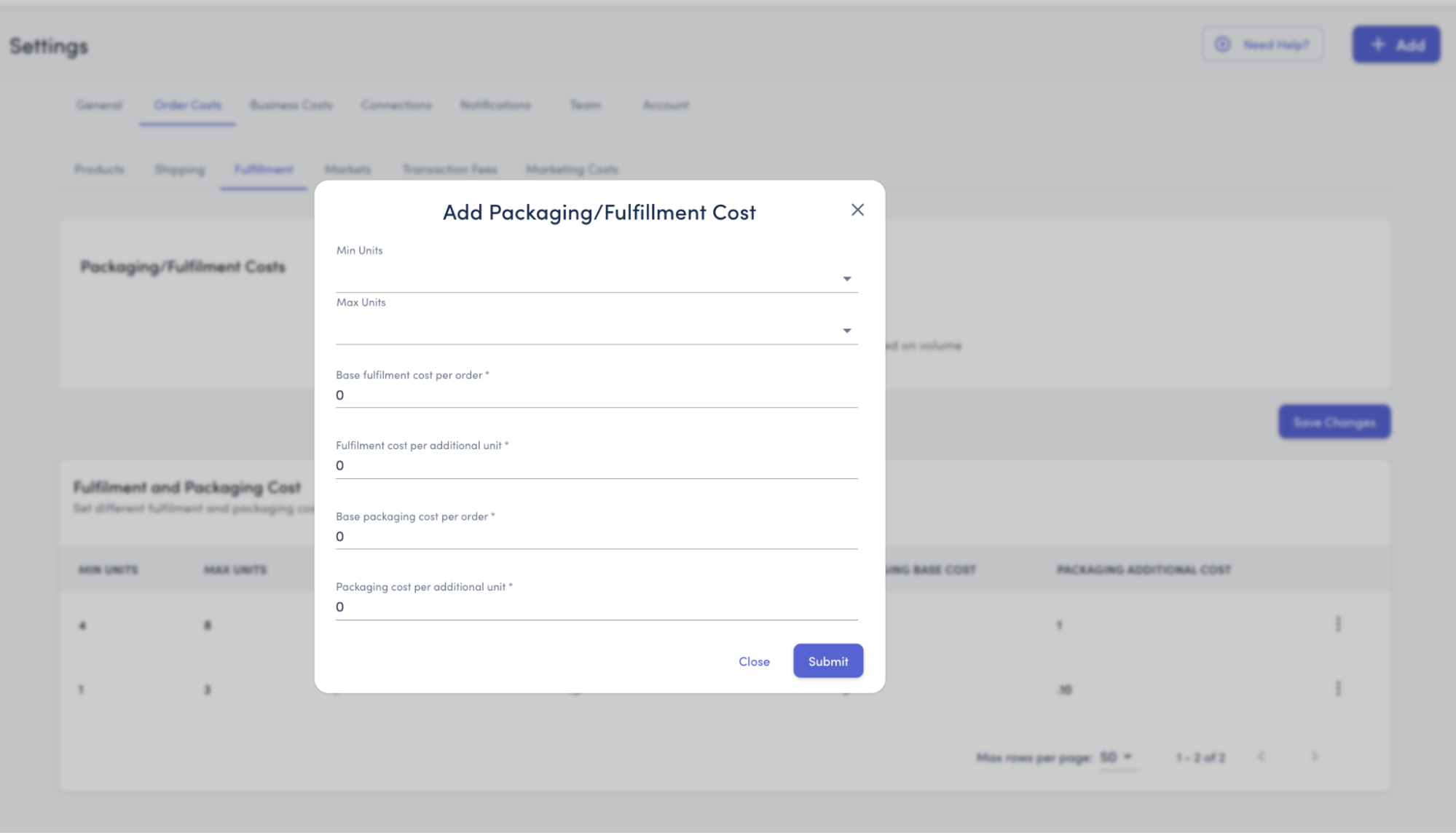
Unit Range:
Min Units - Minimum number of items for this tier (e.g., 1)
Max Units - Maximum number of items for this tier (e.g., 5)
Fulfillment Costs for This Tier:
Base Fulfillment Cost Per Order - The fulfillment charge for orders in this range
Fulfillment Cost Per Additional Product - The charge for each additional item beyond the first
Packaging Costs for This Tier:
Base Packaging Cost Per Order - The packaging charge for orders in this range
Packaging Cost Per Additional Product - The charge for each additional item beyond the first
Click Submit to save this tier
Creating Multiple Tiers
Repeat the process to add additional tiers for different order volumes.
Example Setup:
Tier 1: Orders with 1-5 items
Min Units: 1
Max Units: 5
Base Fulfillment Cost: €4.00
Fulfillment Cost Per Additional Product: €0.40
Base Packaging Cost: €1.00
Packaging Cost Per Additional Product: €0.10
Tier 2: Orders with 6-10 items (discounted)
Min Units: 6
Max Units: 10
Base Fulfillment Cost: €3.50
Fulfillment Cost Per Additional Product: €0.30
Base Packaging Cost: €0.90
Packaging Cost Per Additional Product: €0.08
Tier 3: Orders with 11+ items (further discounted)
Min Units: 11
Max Units: 999 (or leave blank for unlimited)
Base Fulfillment Cost: €3.00
Fulfillment Cost Per Additional Product: €0.25
Base Packaging Cost: €0.80
Packaging Cost Per Additional Product: €0.05
How Variable Pricing Works
StoreHero automatically applies the correct tier based on the number of items in each order:
Order with 3 items → Uses Tier 1 pricing
Order with 8 items → Uses Tier 2 pricing
Order with 15 items → Uses Tier 3 pricing
Switching Between Methods
You can switch between Simple and Variable methods at any time:
Navigate to Settings > Order Costs > Fulfillment
Select your desired method (Simple or Variable)
Click Save Changes
Note: Switching methods will preserve your data, but only the active method will be used for calculations.
Best Practices
For Simple Method
Verify rates with your fulfillment provider before entering
Update costs when your provider adjusts pricing
Double-check that values exclude VAT/GST
For Variable Method
Ensure your tiers don't have gaps (e.g., 1-5, 6-10, 11+)
Order tiers logically from smallest to largest
Review tier performance periodically to optimize pricing
General Tips
Test with a few sample orders to verify calculations
Update costs immediately when provider rates change
Keep records of your provider's fee schedules for reference
Don't Forget to Save
After making any changes to your fulfillment and packaging settings, always click the Save Changes button to ensure your updates are applied.
Need Help?
If you have questions about setting up fulfillment and packaging costs or determining which method to use, our support team is here to help. Contact us at support@storehero.ai