How to Filter Out Ad Spend From a Specific Country
Last updated: November 5, 2025
If you want to isolate or exclude ad spend data from specific countries in StoreHero, you can do this through the Markets configuration settings.
Follow these steps:
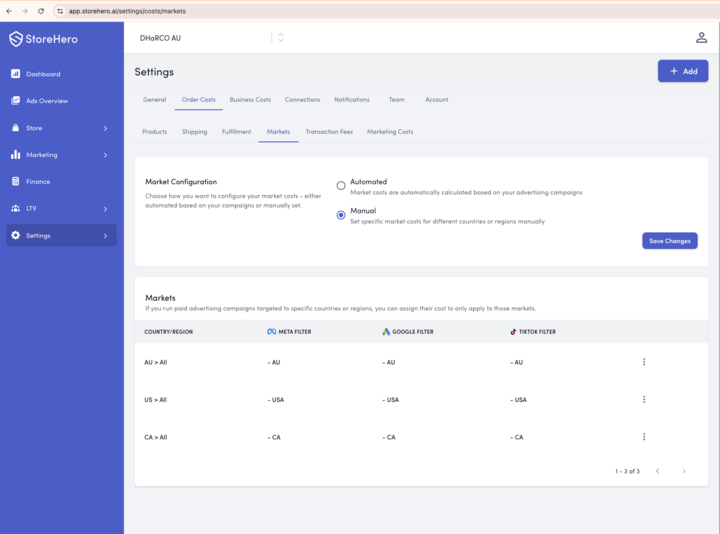
Go to Settings in your StoreHero dashboard.
Click on the Order Costs tab.
Under Market Configuration, select Manual.
In the Markets section, click Add to set up filters for specific regions or countries.
For each country, configure filters for your connected ad channels — Meta, Google, and TikTok — based on campaign names.
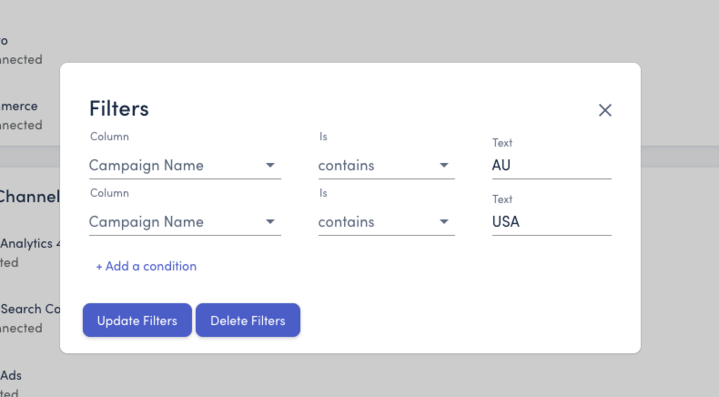
For example, you can use filters like:
Campaign Name contains “AU” for Australia
Campaign Name contains “USA” for the United States
Campaign Name contains “CA” for Canada
Click Save Changes to apply the configuration.
 Note: The total ad spend in your country breakdown will reflect only the campaigns that match your filter criteria. If multiple conditions are set (e.g., “AU” and “USA”), currently only the first one may apply, so ensure your campaign naming convention is consistent across platforms.
Example:
If you configure your filters this way:
Meta Ads Filter: “AU”
Google Ads Filter: “AU”
TikTok Ads Filter: “AU”
Then only Australian campaign ad spend will be included in your dashboard totals and country breakdowns.